Exploring Arts Education With Your Local Library Programs

The California State PTA Arts Education Committee invites students and families to take on an exciting journey to explore your local library! Libraries are not just places to borrow books; they are dynamic community hubs that provide a myriad of opportunities for creative and educational enrichment. Many libraries across the state host adventure activities and guides designed to inspire a love for learning in a fun and engaging manner.

One of the highlights of local library programs is the emphasis on arts and crafts. Many libraries offer workshops and classes where children can explore various art forms, from painting and drawing to sculpture and collage. These hands-on activities not only foster creativity but also help develop fine motor skills and boost self-esteem. Participating in art projects allows children to express themselves in new ways and encourages them to think critically and problem-solve as they work on their creations.

In addition to arts and crafts, libraries often host storytelling sessions, puppet shows, and theatrical performances. These events introduce children to the world of literature and performing arts, sparking their imagination and nurturing a love for storytelling. Storytime sessions are particularly popular, as they bring stories to life through interactive reading and dramatization. Children are encouraged to participate, making the experience more engaging and memorable. For families, these events provide an opportunity to enjoy quality time together while experiencing the magic of stories and performance.

Music is another integral part of many library programs. From sing-alongs and instrument-making workshops to live performances by local musicians, libraries offer a variety of musical activities that cater to different age groups and interests. Engaging with music has numerous benefits for children, including enhancing cognitive development, improving language skills, and fostering emotional expression. Participating in musical activities can also be a joyful and stress-relieving experience for both children and adults.

Libraries are also embracing technology to enhance their arts education offerings. Many libraries now provide access to digital tools and resources that allow children to explore digital art, animation, and graphic design. These tech-based programs are not only fun but also equip children with valuable skills that are increasingly important in today’s digital world. By learning to use these tools, children can combine their artistic talents with technology, opening up new avenues for creative expression.

For parents and caregivers, local library programs offer a convenient and affordable way to keep children engaged and learning throughout the year. Most programs are free or low-cost, making them accessible to families from all walks of life. Additionally, libraries often provide resources and support for parents, such as reading lists, activity guides, and tips for incorporating arts education into everyday life. By participating in library programs, families can create a supportive learning environment at home and continue to nurture their children’s creativity.

California State PTA’s Arts Education Committee encourages all students and families to take advantage of the rich array of programs available at their local libraries. By doing so, they can turn every season into an art-filled learning adventure that will inspire and enrich the lives of everyone involved. Whether through hands-on art projects, storytelling sessions, musical activities, or digital art workshops, libraries offer countless opportunities for creative exploration and growth.

Visit library.ca.gov to find a local library near you and discover the endless possibilities for fun and learning!

Fall in Love with PTA

Fall is the time to make sure your membership campaign, strategy, and goals for 2024-2025 are in full swing. Here are some ideas to keep those memberships coming in throughout the school year:

  • Communicate regularly with your school community.
  • Try new strategies to increase membership. 
  • Ask everyone you know to join your PTA, and share your reasons for being a PTA member.

There are so many reasons why “You Belong in PTA,” whether it is having fun meeting new people and families with kids your child’s age, or connecting to important school and community resources. Remember, sharing is caring, so let’s help one another to increase our membership numbers statewide!

PTA Membership Cards – Needed for Convention

The PTA membership card is a small, but important, document for PTA members. An electronic “card” is available for those PTAs that use TOTEM to collect membership dues. But what about those PTAs that don’t use TOTEM or those members who prefer to join using cash or a check? Cardstock membership cards are available through your district PTA. Membership cards should be given to members at the same time dues are collected.

An important use of the membership card is for convention registration. Whether the electronic or cardstock version is used, convention attendees are required to upload the card image during the registration process.

To print member names on the cardstock membership card, use this downloadable Microsoft Word template.

Cybersecurity Tips & Best Practices to Help Keep Your PTA Secure Online

“There’s not a ‘one and done’ solution for cybersecurity, no silver bullet as we like to call it. With cyber, there needs to be continuous care and feeding of the program. It’s a program that requires ongoing improvement.” -Zaki Abbas

Throughout the state of California, students, parents, teachers, schools, and businesses have become increasingly dependent on the internet to learn, to connect with each other, to shop, and to be entertained. This interconnectedness has opened vistas of possibility for collaboration and for new ways of distributing and consuming information and culture. A home with an internet connection can become a theater, library, meeting place, and shopping mall. While the internet and its related technologies are an amazing advancement, they come with some hazards as well, such as viruses, identity theft, and ransomware. We must balance our consumption of, and participation with, online content against a healthy dose of cybersecurity.

Cybersecurity is not just a concern of multinational corporations. Nor is it only achievable with an astronomical IT budget and a gang of highly skilled experts working 24/7. It is, however, an ongoing, continuous process that must be actively engaged in by all users in a given network. Cybersecurity must exist in layers; it is a posture, not a destination.

Cyber Hygiene Basics

Cyber hygiene is the solid foundation for a healthy cybersecurity posture. It is a collective of practices and principles that, regardless of network or device, help to keep you secure online. Here are some practical tips to keep you safe online:

  • Use strong passwords. Password strength refers to the effectiveness of a given password against guessing or ‘brute-force’ attacks in which a computer program attempts to authenticate using a dictionary of common passwords or phrases. These guesses can happen as fast as thousands of times per second. As computers become more efficient and powerful, so too do brute-force attacks. This means that passwords that were once considered strong are not so any longer. When creating your password, first learn what the requirements are for the service or site (how many characters minimum, any requirements for capitals, numerals, or other special characters, etc.). You can use this information and a password generator to create strong passwords. Or you can develop the habit of creating password phrases that are easier to commit to human memory but harder for computers to guess. A humorous illustration of this technique can be found in this XKCD comic.

A good password should be a mix of letters, numbers, and symbols. Avoid using easily guessable information like your name or birthdate. Consider using a password manager to keep track of all your passwords securely.

  • Don’t recycle passwords. Recycling passwords is the practice of using the same password for multiple contexts or using a base password with only minor variations. It is understandable why people would adopt this strategy. According to a survey conducted by NordPass, in the three years leading up to 2024, the number of passwords that people use on average has increased 70%. The average number of passwords that a single user has to keep track of is now 168, and 87 of those are business-related accounts. 

With that much information to keep track of, password recycling seems like an efficient strategy. In fact, Google polling has shown that 52% of users re-use the same password for different accounts. Unfortunately, any gains in efficiency are offset by the dangers of credential stuffing, or attacks where large collections of stolen passwords are used to try to gain access to a system.

Imagine if you used the same login and password combination for Facebook and your online bank. If Facebook is compromised, the hackers who are responsible not only have your Facebook login but your bank login as well. If you use the same login and password for all your accounts, you can imagine how damaging a single compromise of any of those services could be to you and to your organization.

  • Use 2 factor authentication (2FA) whenever possible. Two factor authentication (2FA) is a technique which augments passwords with a second authentication mechanism that is randomly generated and delivered at the time of authentication. Whether it is a passcode sent via email or text message, or information provided by an authenticator application or device, 2FA helps minimize the possible disruption caused by an unauthorized user getting access to your passwords.
  • Keep antivirus software updated and active. Antivirus software is like a shield that protects your computer from malware and viruses. It scans your files, blocks harmful downloads, and alerts you to potential threats. Make sure you have reliable antivirus software installed, and keep it updated.
  • Make sure that your devices’ operating systems and applications are updated. Software updates aren’t just about getting new features—they also fix security flaws that hackers can exploit. Make sure your operating systems, antivirus software, and apps are always up to date. Turn on automatic updates so you don’t have to worry about missing any important patches.
  • Periodically review installed applications. On both computers and mobile devices, such as tablets and smartphones, it is good practice to regularly review installed applications. Verify that you only have applications that you intended to install. Remove any applications that you have stopped using or were only trying out. Fewer applications means fewer potential vectors for attack, fewer updates, and fewer third parties that may have some of your personal data.
  • Backup your data. Even with the best precautions, there’s always a chance something could go wrong. Regularly backing up your files ensures that even if your computer gets infected, you won’t lose your important data. Use cloud storage or an external hard drive to keep your backups safe.
  • Cultivate healthy skepticism. The anonymity of the internet and its transcendence of geographical location creates a potential for misinformation and misrepresentation. Many cyber threats are more psychological tricks than technological compromises. As Artificial Intelligence (AI) has become more prevalent, it has become harder to tell the difference between the real and the artificial. Bring a healthy skepticism with you when you venture into cyberspace.

Viruses and Malware

Malware and computer viruses are types of harmful software designed to damage or control your computer. They can steal your personal information, slow down your device, or even lock you out of your files. Hackers often use tricky methods to spread these threats, like fake websites, emails, or even social media links.

  • Limit what you do on public Wi-Fi. Public Wi-Fi networks, like those in cafes, libraries, or schools, are super convenient, but they can also be risky. Hackers can easily intercept data on these networks, putting your personal information at risk. Here’s how to stay safe:
    • Avoid Sensitive Transactions: Don’t access your bank account, make online purchases, or enter sensitive information while using public Wi-Fi. Save those tasks for when you’re on a secure, private network.
    • Use a VPN: A Virtual Private Network (VPN) encrypts your internet connection, making it much harder for hackers to see what you’re doing. If you often use public Wi-Fi, consider using a VPN for extra security.
    • Forget the Network: After using public Wi-Fi, make sure to disconnect and “forget” the network. This prevents your device from automatically reconnecting to it in the future, which could expose you to risks.
    • Turn Off Sharing: When you’re on a public network, turn off any file sharing or printer sharing features. This minimizes the chances of someone accessing your device without your permission.
  • Don’t click on links or download anything unexpected. Not everything online is as it seems. Hackers often disguise malware as something harmless, like a free game, a funny video, or an interesting article. Think twice before clicking on a link or downloading a file. If something seems too good to be true, it probably is. Stick to trusted websites and be cautious about opening email attachments or clicking on random pop-up ads.
  • Unsolicited support should make you STOP. One of the most common online scams is the “Microsoft Support” scam. This scam usually begins with a pop-up message on your computer that looks official and claims that your device is infected with a virus. The message may urge you to call a phone number for “Microsoft Support” to fix the problem. In reality, this is a scam designed to trick you into giving away your personal information, paying for fake services, or allowing scammers to access your computer. If this happens to you, follow this general advice:
    • Don’t Panic. Scammers rely on fear to trick you into making quick decisions. If you see a pop-up message claiming that your computer is infected, don’t panic. Take a deep breath and remember that legitimate companies like Microsoft will never ask you to call them through a pop-up message or ask for payment to fix a problem this way.
    • Close the Pop-Up Safely. Never click on any buttons or links within a suspicious pop-up message. Instead, try to close the window using the “X” button in the corner or by pressing “Ctrl + Alt + Delete” to open the Task Manager and close the browser. If the pop-up won’t close, restart your computer.
    • Do Not Call the Number. The pop-up may provide a phone number for “support.” Never call this number. Scammers on the other end of the line might ask you to install software that gives them control of your computer or ask for your credit card information. If you ever need technical support, contact the company directly through their official website or other support channels.

Phishing , Smishing, and Quishing

Phishing, smishing, and quishing are three common online scams designed to trick you into giving up personal information, and it’s important to know how to spot and avoid them.

Phishing is when scammers send fake emails pretending to be from trusted companies like banks or social media sites. These emails often look official and urgent, asking you to click on a link to “verify your account” or “reset your password.” But clicking on these links can lead to websites that steal your login details or install harmful software on your device.

Smishing is similar to phishing but happens through text messages (SMS). You might get a message that looks like it’s from your bank, a delivery service, or even a friend, asking you to click a link or call a number. Just like phishing, smishing is designed to trick you into giving away personal info or downloading malicious apps.

Quishing is a newer scam involving QR codes. You see QR codes everywhere these days—in restaurants, stores, and even on posters. Scammers create fake QR codes that, when scanned, lead to dangerous websites or download harmful files to your phone. Since scanning a QR code is quick and easy, it’s important to think twice before doing it.

How to Protect Yourself

  • Be Skeptical. If something feels off or too good to be true, it probably is. Don’t trust messages or emails just because they look official.
  • Check the Source. If you get an unexpected email, text, or QR code, don’t click on any links right away. Instead, go directly to the company’s official website or app to verify the information. If the message claims to be from someone you know or work with, verify the message with them through a separate communication channel. If you receive a suspicious email or text, contact the person separately by phone, text, or email.
  • Don’t Share Personal Information. Never give out personal details, like passwords or credit card numbers, through links or over the phone unless you are 100% sure of the source.
  • Look for Red Flags. Phishing, smishing, and quishing attempts often have spelling mistakes, strange sender addresses, or generic greetings like “Dear Customer.”

By staying alert and following the above tips, you can avoid falling for these scams and will therefore keep your personal information safe. Remember, it’s better to be cautious than to become a victim.

PTA Highlights of the Month – October 2024

Our PTAs work year round to positively impact all children and families across California, so we want to shine our spotlight on you! During this school year, we will highlight different PTAs each month to showcase the work you do in our schools, classrooms, and communities. Stay tuned to hear how our PTAs are making a difference each day! 

Beacon Park PTA – Phoebe Apperson Hearst Outstanding Family-School Partnership Award Recipient, National PTA School of Excellence

Congratulations to 24 California schools and PTAs that received the 2023-2025 National PTA School of Excellence Award! The School of Excellence program recognizes the invaluable partnerships between local PTAs and schools, and their commitment to building positive educational experiences for students and families. We are pleased to also celebrate Fourth District’s very own Beacon Park PTA for receiving the Phoebe Apperson Hearst Outstanding Family-School Partnership Award! This award is the highest honor presented by National PTA that celebrates effective family-school partnerships. We couldn’t be prouder of the PTA volunteers and school community at Beacon Park for the work they do.

Former Beacon Park PTA President Erin Pauls (2023-2024), shared how their PTA worked together to help bridge the connections between the school and its families through the School of Excellence program framework.

Erin explained, “We deployed an electronic survey at the beginning of the school year […and] we found that the largest area of potential improvement fell in the category of engagement and communication with students and families.” As a result, Beacon Park PTA began building new communication strategies that targeted non-English speaking families to create a pathway of engagement between those families and their greater school community. Erin credits their PTA’s strong foundation with Beacon Park School that allowed them to successfully launch various programs geared towards academic enrichment, community building, athletics, and more.

“We were fortunate enough to work with many administrators, teachers, and even parent volunteers who were all willing to band together to help PTA achieve its goals of creating a more cohesive and engaged community,” Erin said. From a Science Olympiad to Walk to School Day, Beacon Park PTA expanded its reach through innovative events that encouraged and multiplied student, school, and family participation.

We are incredibly proud of the entire Beacon Park community for going above and beyond to reach their community and strengthen their family-school partnership. The School of Excellence program not only provides enhanced strategies for our PTAs to implement, but it provides unique recognition.

“As a leader in various roles over the years, I have come to value the idea that recognition is a powerful tool in motivating and inspiring people. Let’s be honest – who doesn’t love being publicly recognized with an award or designation? I think that the potential of being celebrated on a national level as a School of Excellence designee is a huge draw for PTA members and school staff alike to go above and beyond in investing their time and talents to better their community,” Erin said.

Learn more about the School of Excellence program at pta.org/excellence, and stay tuned for enrollment to reopen in Spring 2025. To view the full list of 2023-25 School of Excellence recipients, click here.

Irvine Unified Council PTA & The Sweet Success of PTA Membership

In September 2024, Irvine Unified Council of PTAs, which represents 43 unit PTAs, launched its theme “Membership is So Sweet!” This news reached residents across the city of Irvine causing excitement among many, including the City of Irvine’s very own Mayor. On September 10, 2024, Mayor Farrah N. Khan proclaimed September as Parent Teacher Association (PTA) Membership Month. Mayor Khan encouraged students, parents, caregivers, families, educators, and citizens to show their commitment to children and youth by joining their local PTA or PTSA.
Thanks to our amazing volunteers at Irvine Unified Council for promoting the sweetness of membership to their Irvine community! Visit iucpta.org to learn more about the Irvine Council and how to get involved if you are located in the Irvine area.

Huntington Union Council PTA & the School Board Candidate Forum

Big thanks to Huntington Union Council PTA for hosting an impartial and nonpartisan School Board Candidate Forum earlier this month. This forum hosted over 10 candidates from Fountain Valley School District, Huntington Beach City School District, Huntington Beach Union HighSchool District, and Ocean View School District. PTA leaders across California have been working hard to provide our families and communities with safe spaces to be educated, informed, and empowered so they can use their voice at the polls.

Want to be included in our next PTA Highlights of the Month?

Submit a PTA Success Story Submission Form to share your PTA’s highlight with us or send us a message on Instagram or Facebook and let us know your PTA would like to be highlighted.

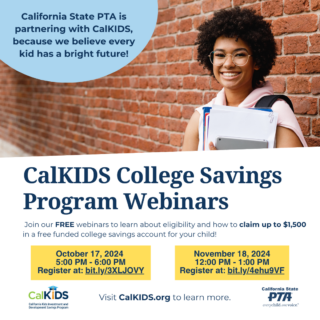
CalKIDS College Savings Program Will Make College More Accessible for California Families From Our Sponsor: CalKIDS

The California Kids Investment and Development Savings Program (CalKIDS), a program administered by the ScholarShare Investment Board, an agency of the State of California and chaired by the State Treasurer, automatically provided eligible, low-income public school children in grades 1-12 in California with the tools to start saving for college, including an initial seed deposit in a college savings account. The State of California created the program to expand access to higher education and encourage families to save for college and other forms of career training, regardless of household income.

Financial concerns shouldn’t stand in the way of a college education for California families. Research shows that children with savings for college are three times more likely to enroll in college and four times more likely to graduate than children without college savings accounts. We want our students to feel supported and know that in California, we believe in the advantages of a higher education and the positive difference that could make in their lives.

Students in grades 1-12 may receive up to $1,500 in college savings

The State of California offers eligible low-income public school students the following awards in a CalKIDS account to save for higher education, as applicable:*

  • $500 initial deposit
  • $500 additional deposit for students identified as foster youth
  • $500 additional deposit for students identified as homeless youth

Over time, funds in a CalKIDS account can grow and be used for future higher education expenses, such as tuition and related fees, books and required supplies, and computer equipment. When the student is ready to use their savings to pay for any qualified higher education expense, they can easily redeem their funds, including any earnings, from their CalKIDS account.

Join California State PTA on either October 17 or November 18 as we hear from CalKIDS to learn about how these funding opportunities can impact the children and families in your schools and community. Register now to secure your spot for our upcoming webinar opportunities. 

Thursday, October 17, 2024
5:00 PM – 6:00 PM
Register Now

Monday, November 18, 2024
12:00 PM – 1:00 PM
Register Now

To learn more about the CalKIDS program, visit CalKIDS.org.

*Student eligibility is defined by the Local Control Funding Formula. The California Kids Investment and Development Savings Program (CalKIDS) is a children’s savings account program, administered by the ScholarShare Investment Board, an agency of the State of California. CalKIDS will provide eligible participants with college savings accounts, including seed deposits and other potential incentives, to help pay for future qualified higher education expenses. To learn more about CalKIDS or opt out of the program entirely, please see the Program Information Guide at CalKIDS.org. CalKIDS participants may also establish individual accounts with ScholarShare 529, California’s 529 College Savings Plan.

SAFETY Act Supports LGBTQ+ Youth and Protects Students from Being “Outed” Without Consent

California State PTA supported Assembly Bill 1955 (Ward), which Governor Newsom signed into law on July 15, 2024. This bill prohibits schools from disclosing a student’s sexual orientation or gender identity while safeguarding educators from retaliation for supporting LGBTQ+ students or following curriculum standards.

PTA firmly believes that all students—including LGBTQIA+ students —have the right to a high-quality, equitable education in a welcoming, supportive, and inclusive school. Every student can reach their full potential when the school environment is one in which they are accepted, are truly valued, and can authentically be themselves. The passage of AB 1955 (Ward) will contribute to creating a safer learning environment for LGBTQ+ students.

Key Facts about “The Support Academic Futures and Educators for Today’s Youth, or SAFETY Act” (AB 1955):

  • The SAFETY Act prohibits school districts from requiring staff to disclose to parents information related to a student’s sexual orientation or gender identity, and will protect school staff from retaliation if they refuse to notify parents of a child’s gender preference.
  • The SAFETY Act does not ban educators from sharing information with parents. It only prohibits policies that require educators to share that information with parents.
  • The SAFETY Act will go into effect on January 1, 2025. In the meantime, it has become the subject of multiple lawsuits within just 72 hours of becoming law. California courts will have the next say in what happens to this policy.

How Does California State PTA Take a Position on a Bill?

The California State PTA Legislation Action Committee (LAC) is authorized to act on behalf of the State Board of Managers when taking a position on legislative bills. Such action must conform to established PTA authorities. The LAC has representatives from across the state who read, analyze, discuss and vote on bill positions brought before the committee.

Here are a few of the PTA authorities used in establishing PTA’s position on AB 1955:

Statement on Inclusion of Parent’s Rights Language in 2024 Department of Defense (DoDEA) schools from National PTA President Yvonne Johnson:

Families are critical to their children’s success and well-being, provide important perspectives on decisions impacting their children and schools, and must be valued and treated as essential partners in their children’s education and development. But it is critical that ‘parents’ rights’ policies support meaningful family engagement and true family-school partnerships and do not cause unintended harm or disproportionately impact or exclude certain students or families.

2020 National PTA Resolution, RESOLVED 3: “That National PTA encourage state, local units, and councils to review school policies specifically focused on the creation of a safe, inclusive, supportive, and accepting environment in schools and support revisions and amendments to those policies that specifically address the topics of sexual orientation and gender identification/ expression as they relate to creating a safe, inclusive, supportive, and accepting school environment free from violence, harassment, intimidation, and bullying.”

2016 California State PTA Resolution, RESOLVED 3: “That the California State PTA seek and support legislation that creates a safe and accepting environment in schools, specifically with updated health education standards that deal with issues of sexual orientation, gender identity, and gender expression.”

Other available PTA resources on the issue:

Save the Date: California State PTA Convention 2025

California State PTA Convention 2025 is scheduled for May 1 through May 4, with pre-convention activities starting on May 1 at 4 pm. Full convention activities begin on the morning of May 2. Start planning now so your PTA is ready to send delegates when registration opens in mid-February.

Convention 2025 will be held at the Ontario Convention Center and will be the first time since 2017 that our State Board of Directors election will happen in southern California. Convention 2025 will offer an amazing exhibit hall, over 50 workshops and plenty of networking opportunities. There will be three general meetings filled with exciting speakers, student entertainment, and the opportunity for our membership to actively participate in the business of the association.

Every unit, council, and district is eligible to send at least two voting delegates to the convention. California State PTA is a membership organization. Our members have a voice in the actions and activities we all believe in. We have set the prices the same as Convention 2024 and will be providing an opportunity to save with early bird pricing from mid-February to mid-April. 

Start planning for Convention 2025 now! We hope to see you in Ontario, next May.

Cellphone Policies in Flux in California Schools

In recent years, several California school districts have adopted bans on cellphone use during instructional time. That trend is about to accelerate with the passage of Assembly Bill 3216.

AB 3216 was signed into law by Governor Newsom on September 24. The new state law requires the governing board of every local educational agency (LEA), county office of education (COE), and charter school to develop and adopt no later than July 1, 2026, a policy to limit or prohibit pupils’ smartphone use while the pupils are in class or at a school site.

Cellphone use in schools has been a topic of increasing interest, and often of debate, in recent years. Several school districts in California, including the 429,000-student Los Angeles Unified School District, have adopted bans, according to this EdSource article. This followed legislation Newsom signed in 2019 authorizing school districts to limit or prohibit students’ use of cellphones at school. The governor expressed an interest in building on that law to further restrict students’ cellphone use at school. His support came after the U.S. Surgeon General Vivek Murthy called on Congress to require warning labels on social media platforms to advise that social media use can harm teenagers’ mental health.

Between now and the July 1, 2026 deadline for policy adoption, school communities will likely be debating what types of limitations they wish to impose on student cell phone use. After initial adoption, districts are required to review and update their policies every five years. In addition, districts are required to include “significant stakeholder participation” as they develop their policies in order to “ensure that the policies are responsive to the unique needs and desires of pupils, parents, and educators in each community.” 

The new law includes some exceptions, saying:

  • Pupils cannot be prohibited from possessing or using a smartphone in the case of an emergency or perceived threat of danger, 
  • Educators can grant permission for smartphone use when appropriate
  • Individual students may be exempted from the rule based on a physician’s determination or as required in an individualized education program. 

Your PTA can take several actions to assure your school district sets a policy supported by the community, and that students and families stay informed about the policy process. 

PTAs can call for a meeting about smartphone use, inviting administrators to fully explain the new law and district plans for policy development and adoption. You can also make sure district officials involve students and parents/caregivers in the decision making process, including ways to effectively implement the policy once it is adopted. 

Some parents/caregivers have concerns that their school district does not have an effective communication system when there is a crisis at the school. You can collaborate with other PTAs, with assistance from council or district, to make sure every school has an effective system for communicating both internally and externally in an emergency. That can include the use of strategies such as text messaging and social media. 

Expert articles, such as this one from UCLA Health, may also help families better understand the rationale behind the new law and changes in local policy. 

Your PTA can use this change to also remind parents/caregivers that they are role models to their children regarding cellphone use. That can include limiting their own cellphone use, especially during gatherings with family such as dinner time, and engaging in responsible use of social media. National PTA provides a wealth of resources to help your PTA engage with parents regarding how to guide their children when navigating the digital world.

Navigating the New School Year: Embracing AI in Education

As we embark on a new school year, technology continues to reshape education in profound ways. Artificial Intelligence (AI) is becoming an increasingly vital component, with students now using AI tools for tasks such as essay writing, grammar correction, and personalized learning experiences. By staying informed about these advancements, parents, teachers, and guardians can better support their students’ educational journey.

Embracing these technologies can significantly enrich your student’s learning experience. Engaging with these tools will empower you to provide stronger support for your student and contribute to a successful and fulfilling school year.

The Role of AI in Education:
AI encompasses a range of technologies from search engines and facial recognition to predictive analytics. The educational sphere includes generative AI tools like ChatGPT, which assists with writing and feedback. Additionally, speech recognition and adaptive learning platforms customize educational content to meet individual needs.

Challenges and Considerations:
While AI has the potential to transform education, it also brings challenges such as data privacy concerns, security risks, and the delicate balance between assistance and academic integrity. This is where we, as parents and educators, can guide students in using AI responsibly.

Tips for Parents:

  1. Encourage a Balanced Approach:
    While technology is a powerful educational tool, it is important to encourage your child to balance screen time with offline activities.
  2. Stay Informed:
    Keep abreast of the latest AI developments and their implications for education. Participate in workshops or webinars on AI in education whenever possible.
  3. Engage with Educators:
    Maintain regular communication with your child’s teachers to understand how AI tools are being utilized in the classroom and how you can support these efforts at home.
  4. Promote Digital Literacy:
    Help your child develop a strong understanding of how to use AI technologies ethically and effectively.
  5. Provide Constructive Feedback:
    Share your experiences and insights on AI tools with your school and PTA. Your feedback can play a crucial role in refining the use of these technologies in our educational system.